Reduce a model with symmetry
Use a symmetry boundary condition to halve the mesh for a box centered on the floor of a duct. Keep the half at y ≥ 0 and apply symmetry at y = 0.
Choose the plane and keep one half
Cut both the duct and box at y = 0:
| Geometry | Full duct: y extent | Half duct: y extent |
|---|---|---|
| Domain | −0.06 to +0.06 m | 0 to +0.06 m |
| Box | −0.02 to +0.02 m | 0 to +0.02 m |
This JSON defines the half-domain:
{
  "domain": {
    "origin": [0.0, 0.0, 0.0],
    "size": [0.3, 0.06, 0.06]
  },
  "cuboid_components": [
    {
      "tag": "box",
      "bbox": {
        "origin": [0.1, 0.0, 0.0],
        "size": [0.06, 0.02, 0.02]
      },
      "thermal_model": "insulating"
    }
  ]
}
Trim the geometry explicitly; adding symmetry does not remove the other half. The complete requests are linked below.
Apply symmetry to the cut face
Add this entry to domain.boundary_conditions in the half model:
{
  "boundary": {
    "full": {
      "side": "y_min"
    }
  },
  "condition": {
    "symmetry": {}
  }
}
Apply the condition to the exterior domain face, including where it touches the box. It sets y velocity to zero and applies zero normal gradients to x and z velocity, pressure, temperature, and turbulence fields. It allows tangential flow and adds no wall treatment.
A conducting solid at the cut has zero normal heat flux; the insulating box needs no thermal condition. Unconfigured domain faces remain no-slip walls, so leaving y_min unconfigured would block tangential flow too.
Compare the results
Toggle between the full and half simulations, then select speed or pressure. The horizontal slice is 10 mm above the floor; arrows show the flow direction. Both views use the same colour scales and camera.
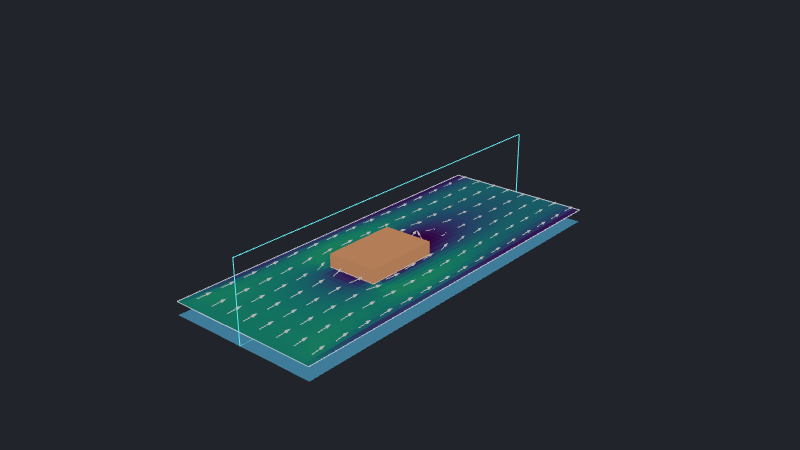
Both models use a 5 mm maximum cell size with wall-layer sizing suppressed.
Download the full-duct request or half-duct request to run either simulation.
Keep the physical inputs symmetric
Keep inlet speed, pressure, material properties, and heat flux per unit area unchanged. Halve prescribed total flow rates and the power of components cut in half. Double integrated results to recover full-model totals; temperatures, pressures, and local velocities need no scaling.
The geometry, inputs, and expected flow must all be symmetric. Uneven heating, asymmetric inlets, or an asymmetric wake invalidate the reduction. With buoyancy enabled, gravity must lie in the symmetry plane; this example disables buoyancy. Only axis-aligned exterior domain faces support symmetry.
See also
- Set the computational domain explains the domain bounds and coordinate axes.
- Select a boundary region explains domain faces and patch selection.
- Flow boundary conditions explains inlet and outlet behavior.
- Configure the mesh explains cell-size and wall-layer controls.
- API reference lists the exact boundary-condition schema.